
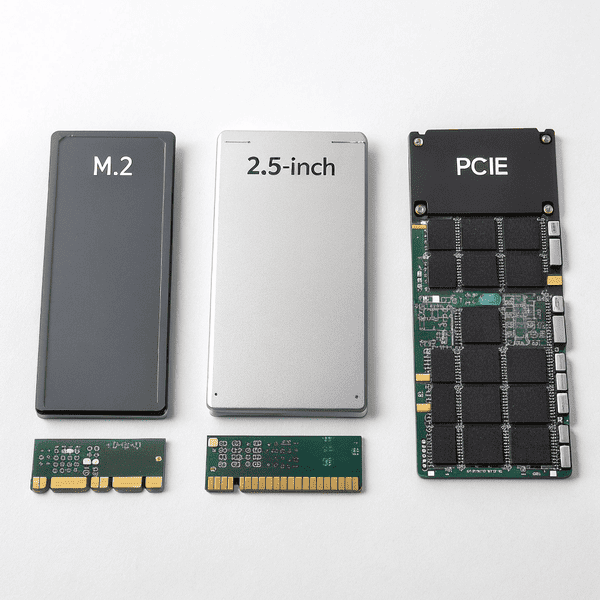
Storage needs are growing fast, and slow, unreliable drives frustrate users and businesses. Many people want something Storage needs are growing fast, and slow, unreliable drives[^1] frustrate users and businesses. Many people want something faster and tougher than hard disk drives.
[^1]: This resource will provide insights into the drawbacks of using slow drives and the importance of upgrading to better options.
A solid state drive (SSD) is a modern storage device that uses flash memory to store and access data quickly, with no moving parts, delivering faster and more reliable performance than traditional hard disk drives.
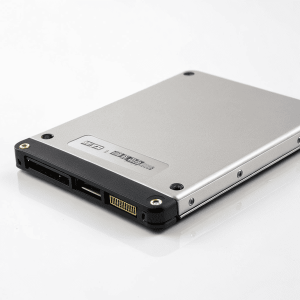
Tech upgrades have changed everything about file storage. SSDs move files nearly instantly. They stay tough even through shock and vibration. This new speed and resilience help you focus on projects, business growth, or gaming. If you want reliable performance and quick data access, it’s worth learning how SSDs work and how to pick the best type for your needs.
What is a Solid State Drive?
Slow boot times and noisy hard drives make everyday work stressful—users just want storage that works, fast and quiet.
A A solid state drive (SSD) is a storage device that uses NAND flash memory[^1], letting computers read and write data much faster than mechanical hard drives. SSDs have no moving parts and are known for speed and durability.
[^1]: Learn about the technology behind NAND flash memory and its role in enhancing SSD performance.
is a storage device that uses NAND flash memory, letting computers read and write data much faster than mechanical hard drives. SSDs have no moving parts and are known for speed and durability.
Inside an SSD: How Does It Work?
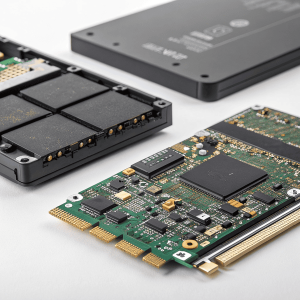
An SSD uses small memory chips, called NAND flash, to store data. These chips replace the spinning platters and read/write heads found in traditional hard drives. SSDs move data using electronic circuits rather than physical movement, which is why they’re so quick. Because no parts move, SSDs are much less likely to fail from drops or shocks.
SSDs also use controllers—tiny processors inside the drive—that manage where data lives in memory, boost speed, and keep your files organized. Some advanced SSDs add features like error correction, encryption, andSSDs also use controllers—tiny processors inside the drive—that manage where data lives in memory, boost speed, and keep your files organized. Some advanced SSDs add features like error correction[^1], encryption, and wear leveling to make them tougher and last longer.
[^1]: Understanding error correction can help you appreciate how SSDs maintain data integrity and reliability.
to make them tougher and last longer.
| Component | Function | Why It Matters |
|---|---|---|
| NAND Flash | Stores data electronically | Enables fast, durable storage |
| Controller | Manages data reading/writing | Improves speed and reliability |
| Interface | Connects SSD to the computer | Decides total speed |
When I switched my own business computers to SSDs, startup time dropped to seconds and file copy speed increased sevenfold. The quiet and lower heat output made my office much more pleasant to work in.
What is an example of a Solid State Drive?
Choosing a new drive isn’t easy without knowing real-world models and what they’re built for.
A common example of a solid state drive is the Samsung 870 EVO (SATA SSD) or A common example of a solid state drive is the Samsung 870 EVO[^1] (SATA SSD) or Western Digital Black SN850 (NVMe SSD), both known for fast speeds and strong reliability in home or business computers.
[^1]: Explore this link to understand why the Samsung 870 EVO is a top choice for speed and reliability in SSDs.
(NVMe SSD), both known for fast speeds and strong reliability in home or business computers.
SSD Examples: Consumer, Professional, and Data Center Choices
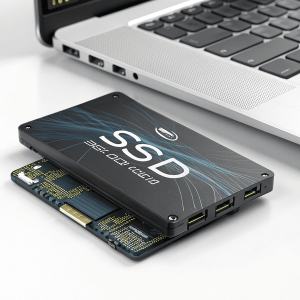
SSDs come in many forms and brands. For home use, the Samsung 870 EVO is popular. It’s a SATA SSD, fitting most desktops and laptops, offering good speed for routine tasks. For higher performance, pros and gamers may use the Western Digital Black SN850, which uses NVMe technology for blazing read/write speeds—great for gaming and editing video.
For businesses and server rooms, data center SSDs likeFor businesses and server rooms, data center SSDs[^1] like KIOXIA CM6 or Intel DC P4510 pack high endurance, reliability, and advanced security. These SSDs handle huge loads and keep systems running day and night.
[^1]: Explore this link to understand how data center SSDs enhance performance and reliability for businesses.
or Intel DC P4510 pack high endurance, reliability, and advanced security. These SSDs handle huge loads and keep systems running day and night.
| SSD Name | Category | Key Benefit |
|---|---|---|
| Samsung 870 EVO | Consumer | Affordable, reliable, fast |
| WD Black SN850 | Professional | Ultra-fast NVMe speeds |
| KIOXIA CM6 | Data Center | Endurance, security, speed |
| Intel DC P4510 | Enterprise | High capacity, durability |
I always recommend starting with a proven model from Samsung or Western Digital for personal use, and moving to KIOXIA or Intel SSDs for professional or enterprise workloads.
What is SSD and its types?
Storage confusion keeps people from upgrading. With so many SSD types, picking the right one matters.
SSD stands for solid state drive—a storage device that uses flash memory instead of spinning disks. The main types are SSD stands for solid state drive[^1]—a storage device that uses flash memory instead of spinning disks. The main types are SATA SSDs, NVMe SSDs, and PCIe SSDs, each varying in speed, cost, and connection.
[^1]: Understanding solid state drives can help you choose the right storage solution for your needs.
, NVMe SSDs, and PCIe SSDs, each varying in speed, cost, and connection.
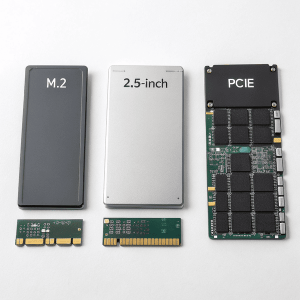
Breaking Down SSD Types: From Entry-Level to High Performance
SSDs can be grouped by how they connect and transfer data. SATA SSDs use the same connectors as older hard drives, making them easy to upgrade but limited in speed (about 550 MB/s). NVMe SSDs use PCIe lanes, hitting speeds up to 7,000 MB/s and taking advantage of modern CPUs and chipsets.
There are also mSATA and M.2 SSDs, which are smaller in size and fit compact laptops or ultra-fast desktops. There are also mSATA and M.2 SSDs[^1], which are smaller in size and fit compact laptops or ultra-fast desktops. Enterprise SSDs, such as U.2 or EDSFF, are optimized for data centers with advanced features.
[^1]: Understanding the differences can help you choose the right SSD for your device, ensuring optimal performance.
, such as U.2 or EDSFF, are optimized for data centers with advanced features.
| Type | Connection | Speed | Typical Use |
|---|---|---|---|
| SATA | SATA III | 500 MB/s | Laptops, desktops |
| NVMe (M.2) | PCIe | 3,500-7,000 MB/s | Gaming, workstations |
| U.2, EDSFF | Enterprise | 3,500+ MB/s | Servers, data centers |
| mSATA | Mini SATA | 500 MB/s | Compact laptops |
In my own work, I use SATA SSDs for older PCs, NVMe when I need top speed for video editing, and enterprise SSDs for server tasks where downtime hurts. Picking the right type depends on use case, budget, and the gear in your hands.
Conclusion
Solid State Drives speed up data access, reduce failures, and match different needs with their wide range of types for every user.